


OAN Fusion Sync
Oracle Fusion data, synced and monitored
OAN Fusion Sync loads flat files into Oracle Fusion with file-based import, and extracts Fusion data into your Oracle database with BICC and BI Publisher. One Oracle APEX workbench that orchestrates Oracle's own APIs, so you define, run, and monitor every job in one place.
- Load flat files into Oracle Fusion with a guided, validated workflow
- Extract Fusion data into your Oracle database, reconciled and monitored
- Define, execute, and monitor every job from one dashboard
- A thin orchestration layer over Oracle APIs, not another data store
The problem
Moving data in and out of Fusion is two hard jobs, done by hand
Loading data into Oracle Fusion and getting it back out are usually separate, manual efforts, held together by templates, scripts, and spreadsheets, with no single place to run or watch them.
Every Fusion load means FBDI templates, CSV files and ESS jobs by hand.
Turning our Fusion extracts into a reliable feed is its own project.
Inbound and outbound run on different scripts, so nobody sees what failed.
Our rules live in people's heads, and the runs happen on a laptop.
One tool, both ways
Pick a direction and jump straight to it
OAN Fusion Sync covers the full round trip of Oracle Fusion data. Both directions are right here, so choose where to start.
Load flat files into Oracle Fusion
Turn a CSV or Excel file into live Fusion data. A guided workflow maps it, validates it, learns its format, and loads it through file-based import and ESS.
Explore inboundExtract Fusion data into your database
Move Fusion data into your Oracle database with BICC and BI Publisher, staged, loaded, delete-synced, and reconciled, on a schedule you control.
Explore outboundOne workbench, not another data store
OAN Fusion Sync is an orchestration layer. It calls Oracle-supported APIs, file-based import and ESS to load, BICC and BI Publisher to extract, and keeps only your definitions, validation rules, mappings, and run history. Your business data moves between Oracle Fusion and your database, never into a separate repository.
Inbound · ingest
Load flat files into Oracle Fusion
Built on Oracle file-based import and ESS, made simple. Upload a file, and a guided workflow maps it, validates it, learns its format, and loads it into Fusion, with the whole operation on one dashboard.
A guided import, from file to Fusion
Upload a CSV or Excel file and move it through a clear seven-step flow: source intake, map to interface, validate, review and fix, generate the file, load, and fix errors. No hand-built templates, no manual ESS submission.
No-code validation before it reaches Fusion
Define blocking and warning checks on any interface column, without writing code. Blocking rules stop bad lines from ever reaching Fusion, and warnings let them pass with a flag. Built-in rules cover the essentials, and you add your own.
It learns each file format you send
The workbench learns every source layout and its field mapping. Map a new format once, and each file that arrives in that format afterward is recognized and processed automatically, however many teams and systems it comes from.
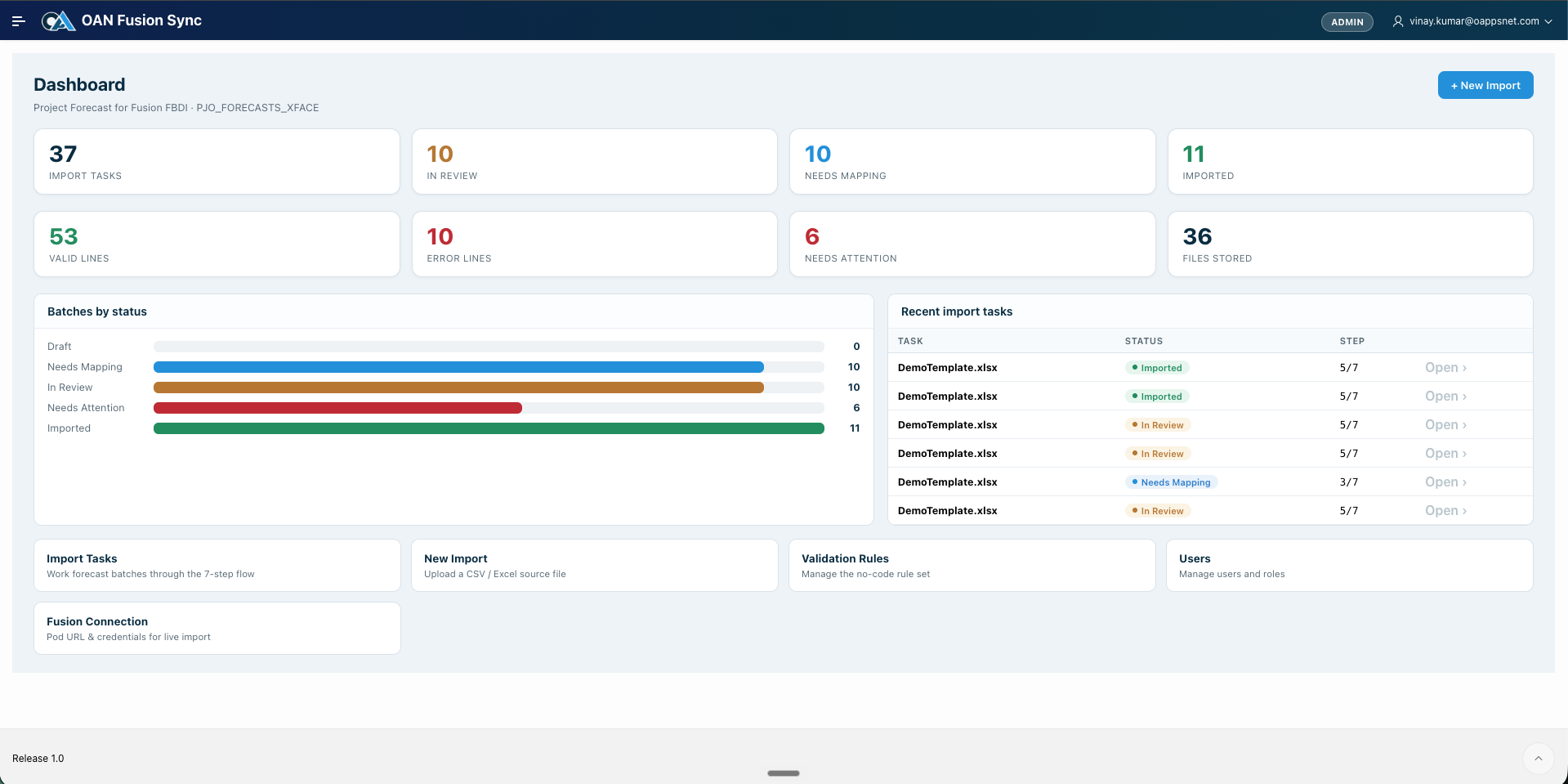
Every import, at a glance
An eagle-eye view of all import tasks and where each one stands: needs mapping, in review, imported, or needs attention, with valid and error line counts and recent activity. Run the whole operation from one screen.
Outbound · extract
Extract Fusion data into your Oracle database
BICC and BI Publisher pull your data, and OAN wraps them in a real pipeline: staged in your database, loaded into your tables, delete-synced, and reconciled against the source, all scheduled and monitored.
The health of your feeds, at a glance
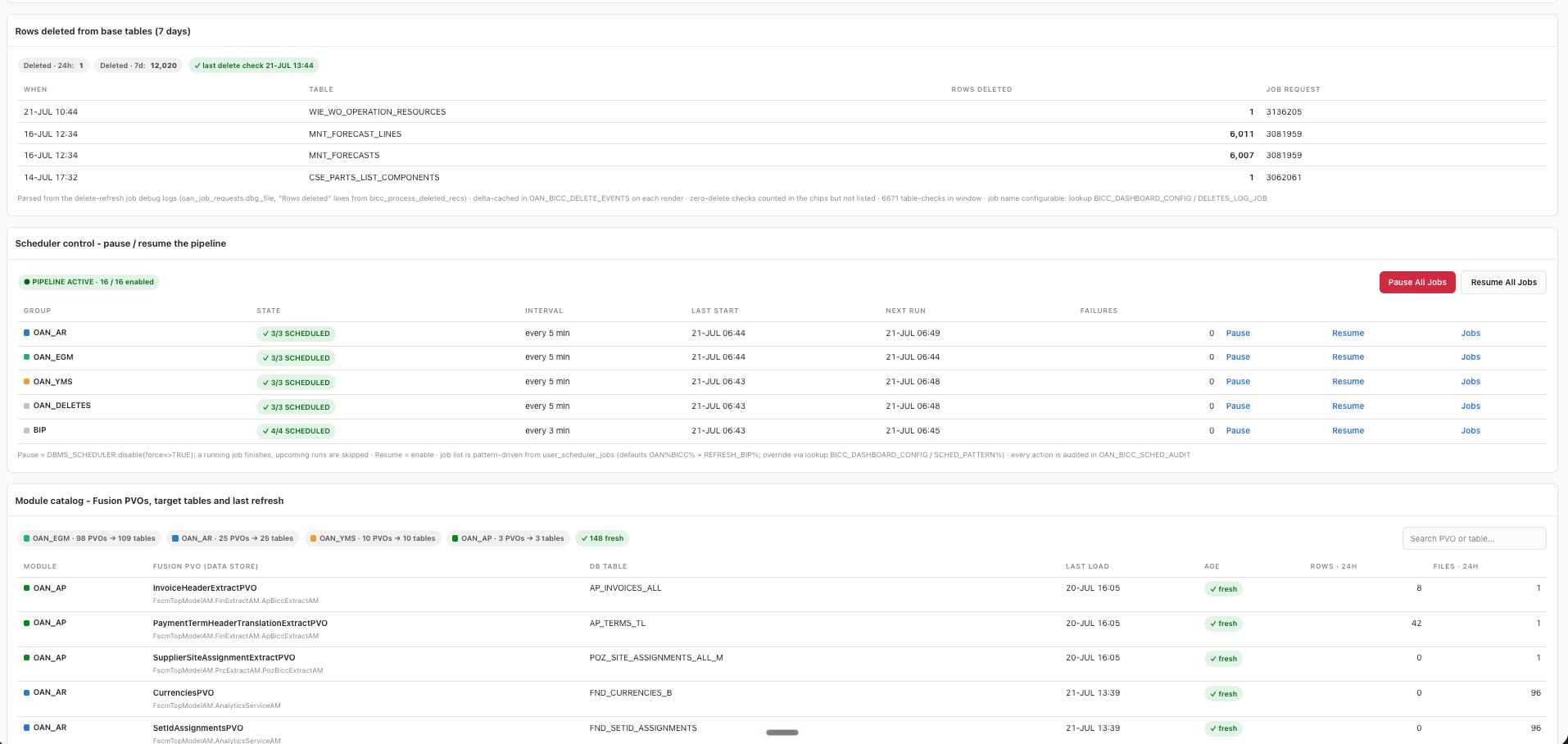
Jobs run today, what is in-flight, files pending load, failures, and rows extracted, plus the active pipeline of files downloaded but not yet loaded. The state of every outbound feed, without reading a single log.
Full lineage and schedule control
Trace every Fusion public view object to its database table, with last refresh and recent file activity, so anyone can follow the flow. Run jobs on a schedule, and pause the whole pipeline or a single job before an upgrade, all audited.
Answers the question users actually ask
A plain-language view of whether your data is current. Every synced table, when it last received data, its status, and rows received recently, so business users get a straight answer without asking IT.
Provable parity with Oracle Fusion
Compare row counts between Oracle Fusion and your database, table by table, with the exact difference on every mismatch. Deletes are reconciled so removed rows do not linger, and snapshots keep a history you can defend at audit time.
The whole point
Define. Execute. Monitor
Every job, inbound or outbound, follows the same simple rhythm. That is what makes Fusion data something your whole team can run, not just one specialist.
Define
Set up mappings and no-code rules once. The workbench remembers source formats and templates, so the next file needs no setup at all.
Execute
Run a job on demand or on a schedule. Inbound loads and outbound extracts follow the same simple flow, no scripts to babysit.
Monitor
One dashboard for every job, file, status, and error, in both directions. Anyone on the team can see what ran and what needs attention.
Deployment & trust
Native to your stack, built to be trusted
An Oracle-native application that runs where your data runs, using supported Oracle paths in both directions, with the controls IT leaders expect.
Orchestration, not a data store
OAN Fusion Sync calls Oracle-supported APIs and keeps only your definitions, rules, mappings, and run history. Business data moves between Fusion and your database, never into a separate store.
Built on Oracle APEX
A native Oracle application, not a new platform to license and learn. It lives next to your data, on the stack your team already runs.
Your database, OCI or on-premise
Works whether your Oracle database is on Oracle Cloud Infrastructure or on-premise. Data residency follows your database.
Standard Oracle paths
Inbound loads through file-based import and ESS. Outbound uses BICC and BI Publisher. Supported Oracle mechanisms, both directions.
Users, roles, and audit
Assign who can define rules, run jobs, and manage the Fusion connection. Scheduler and configuration changes are captured for audit.
Incremental and scheduled
Outbound jobs move only what changed since the last run, on the interval you set, keeping your database continuously current.
 Built on Oracle APEX, using Oracle-supported APIs
 Independently audited controls
Questions IT leaders ask
Straight answers on import, extract, and control
How data moves both ways, and what stays under your control.
What is OAN Fusion Sync?
OAN Fusion Sync is an Oracle APEX workbench that moves data both into and out of Oracle Fusion Cloud Applications. Inbound, it loads flat files into Fusion through file-based import (FBDI) and the ESS import job. Outbound, it extracts Fusion data into your Oracle database using BICC and BI Publisher. You define, execute, and monitor every job from one dashboard.
Is OAN Fusion Sync a staging database?
No. It is an orchestration layer, not a data store. It calls Oracle's own APIs, FBDI and ESS to load and BICC and BI Publisher to extract, and keeps only your definitions, validation rules, mappings, and run history. Business data moves between Oracle Fusion and your database, not into a separate repository.
How does importing data into Oracle Fusion work?
You upload a CSV or Excel file, and the workbench maps it to the Fusion interface, runs your validation rules, lets you review and fix any issues, generates the FBDI file, and loads it into Fusion through the standard ESS import. The whole path is a guided seven-step workflow.
Do I have to build a template for every file?
No. The workbench learns each source format and its field mapping. You map a new format once, and after that it recognizes and processes files in that format automatically.
Can I stop bad data before it reaches Fusion?
Yes. You define no-code blocking and warning rules on any interface column. A blocking rule stops a line from reaching the generated file, and a warning lets it pass with a flag, so only clean data loads into Fusion.
How does the outbound extraction work?
BICC pulls data from Fusion public view objects, or a BI Publisher report runs your SQL. The data lands in staging tables in your database, a load job merges it into your application tables, deletes are reconciled, and a count check confirms your database matches Oracle Fusion.
Does it run on OCI or on-premise?
Both. OAN Fusion Sync runs on Oracle APEX and works whether your Oracle database is on Oracle Cloud Infrastructure or on-premise. Data residency follows your database.
Is the data real-time?
Outbound extraction is scheduled and incremental rather than real-time, moving only what changed on the interval you set. Inbound loads run when you submit them, on demand.
Related products
Explore related products
OAN Platform Monitoring
Cost, security and health of your OCI environment in one view.
Learn moreOAN Verify
No-code tests that business teams build, run and evidence.
Learn moreOAN Operational Analytics
KPIs, alerts and plain-language answers on live transactions.
Learn moreOAN Assist
Answers and next steps inside your Oracle workflows.
Learn moreThe OAN platform
The shared platform every OAN product runs on.
See the platformOAN Fusion Sync
Ready to move Oracle Fusion data both ways, simply?
Book a working session with an OAN architect. Bring a file you load into Fusion and a dataset you pull out of it, and we will show you both running in OAN Fusion Sync.
No commitment. A working session with architects who have shipped Oracle Fusion data pipelines before.