


AP Invoice Automation for SAP
AP invoice automation for SAP
Automate invoice capture, coding, matching, approvals, and posting on top of SAP, with room for the business rules that are expensive to build in SAP or the Vendor Invoice Management add-on. OAN handles that work on its own layer, validates against SAP, and posts through SAP’s own interfaces.
Available forOracle EBSOracle FusionPeopleSoft
- Capture, code, match, and approve invoices before they ever reach SAP
- Handle your business-specific exceptions without SAP customization
- Validate against live SAP data: suppliers, purchase orders, goods receipts
- Post natively through SAP, which stays your system of record
The problem
Getting invoices into SAP still takes a lot of manual work
The invoice work around SAP, capture, coding, matching exceptions, and approvals, is manual and rigid. And the standard fix, the Vendor Invoice Management add-on, is a heavy, tightly-coupled project of its own.
We still type invoices into MIRO and FB60 by hand.
One small match variance blocks payment and clogs GR/IR at close.
Non-PO invoices need manual coding, and one mistake hits our financials.
Invoices wait in approval when an approver is away, so we pay late.
Every small rule change in SAP turns into a customization project.
Our S/4HANA move could mean rebuilding our VIM configuration.
Capabilities
What happens to an invoice before it posts to SAP
Capture and extract
- Capture from any channel, with AIEmail, PDF, scan, or electronic data interchange in. AI reads the header and line detail, so no one keys invoices into MIRO or FB60 by hand.
- Automated codingGeneral Ledger accounts, cost centers, work breakdown structure, and internal orders assigned by rule and by learning, for both purchase-order and non-PO invoices.
Match and resolve
- Flexible matchingTwo-way and three-way matching (purchase order, goods receipt, invoice) with tolerances you set by vendor, category, or entity, and partial-receipt handling.
- Route and resolve exceptionsBlocked invoices, missing goods receipts, and one payment across many invoices: route and resolve each with your own rules, before they reach SAP.
Approve and control
- Mobile approvalsA configurable approval matrix by amount, entity, department, or project, with mobile sign-off so approvals do not wait for someone to be at their desk.
- Controls and auditDuplicate and fraud checks, segregation of duties, and a complete audit trail from capture to the posted SAP document.
End-to-end automation
How OAN transforms AP
End-to-end automation that handles the entire invoice lifecycle around SAP, from receipt to posting.
The solution
Handle the flexible AP work outside SAP, then post it into SAP
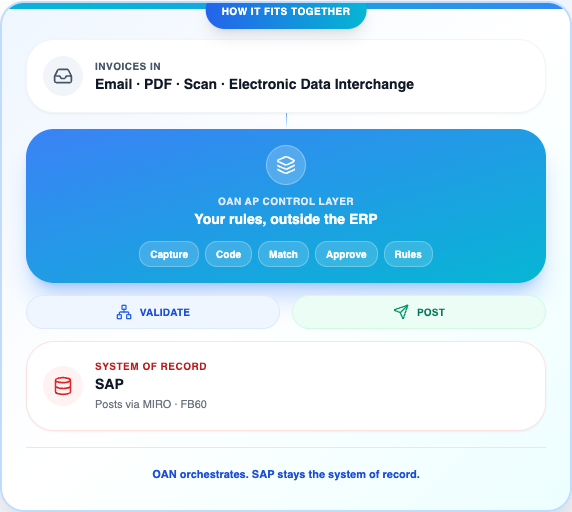
OAN handles the flexible, business-specific part of AP on its own layer, then talks to SAP for validation and posts through SAP’s own interfaces. You get flexibility without customizing your ERP.
Add a flexible layer
Capture, code, match, approve, and apply your business rules on the OAN layer, where a change is configuration, not an SAP customization or a Vendor Invoice Management reconfiguration.
Validate against live SAP data
Every invoice is checked against SAP in real time: supplier master, purchase order, goods receipt, tolerances, and duplicate checks. Nothing moves on stale copies.
Post through SAP, cleanly
Validated invoices post through SAP's own interfaces (the MIRO and FB60 transactions, or standard SAP invoice APIs), so they process the normal SAP way. SAP stays the system of record.
Architecture
Your invoices stay in SAP, not in another system
OAN does not become a second place your invoices live. It drives SAP's own transactions, the invoice entry screens (MIRO and FB60) and standard invoice interfaces, and keeps only its working records: capture rules, coding and tolerance logic, approvals, and audit history. SAP stays the single source of truth for the posted document, the Goods Receipt / Invoice Receipt account, and the payment.
- Invoices captured from any channel and coded to General Ledger accounts and cost centers
- Validated live against SAP suppliers, purchase orders, goods receipts, and tolerance keys
- Variances resolved before they ever become blocked invoices
- Posted through SAP's own invoice entry (MIRO and FB60), ready to process
Capture & extract
Get invoice data ready for SAP faster and more accurately
Intelligent document capture
Accept invoices from any channel: email, PDF, scan, or EDI. AI reads header and line detail, so no one keys invoices into MIRO or FB60 by hand.
AI-powered data extraction
Advanced OCR and machine learning extract header and line-level data with high accuracy, ready to post to SAP.
Process & automate
Eliminate manual work and accelerate approvals
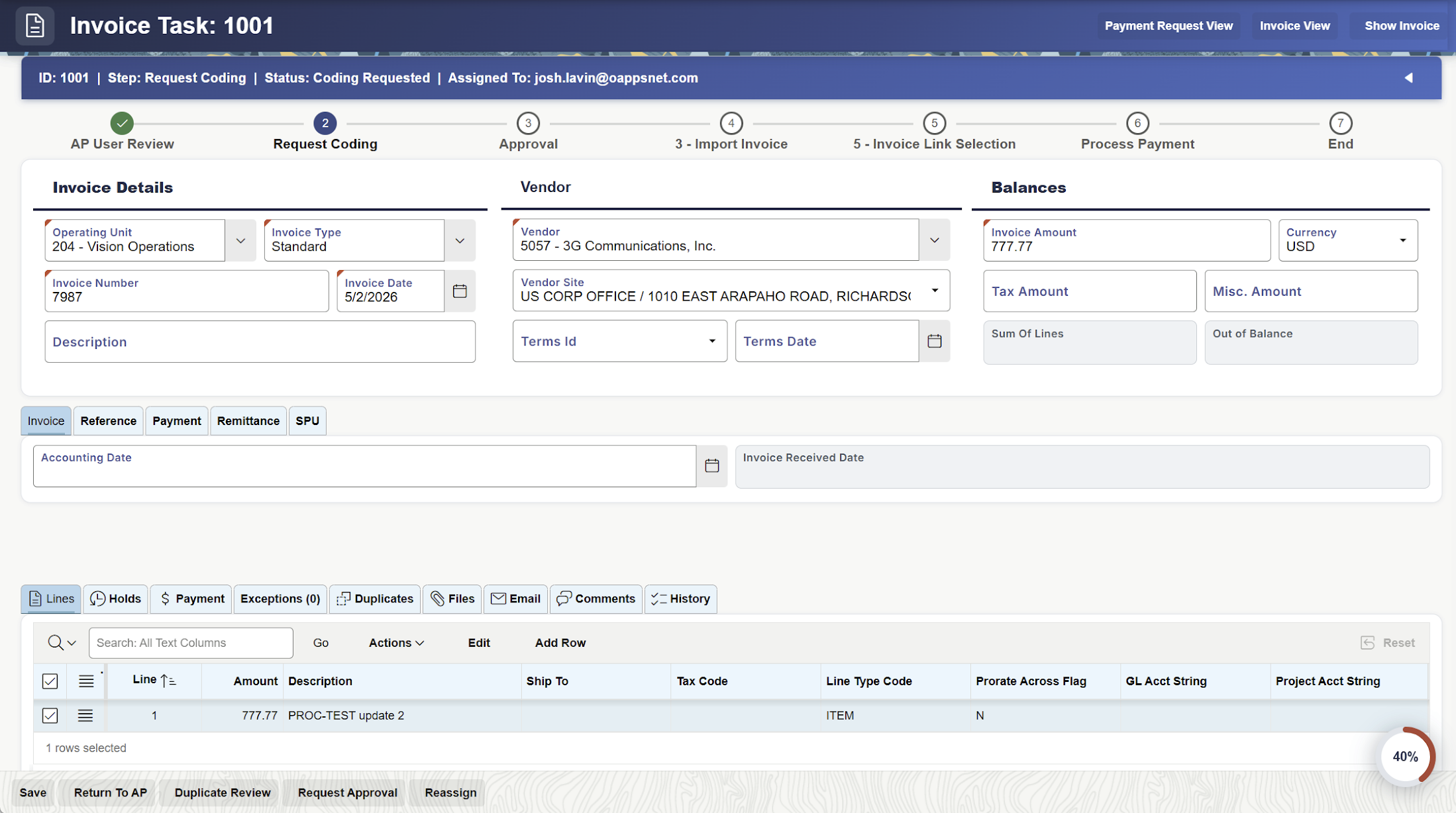
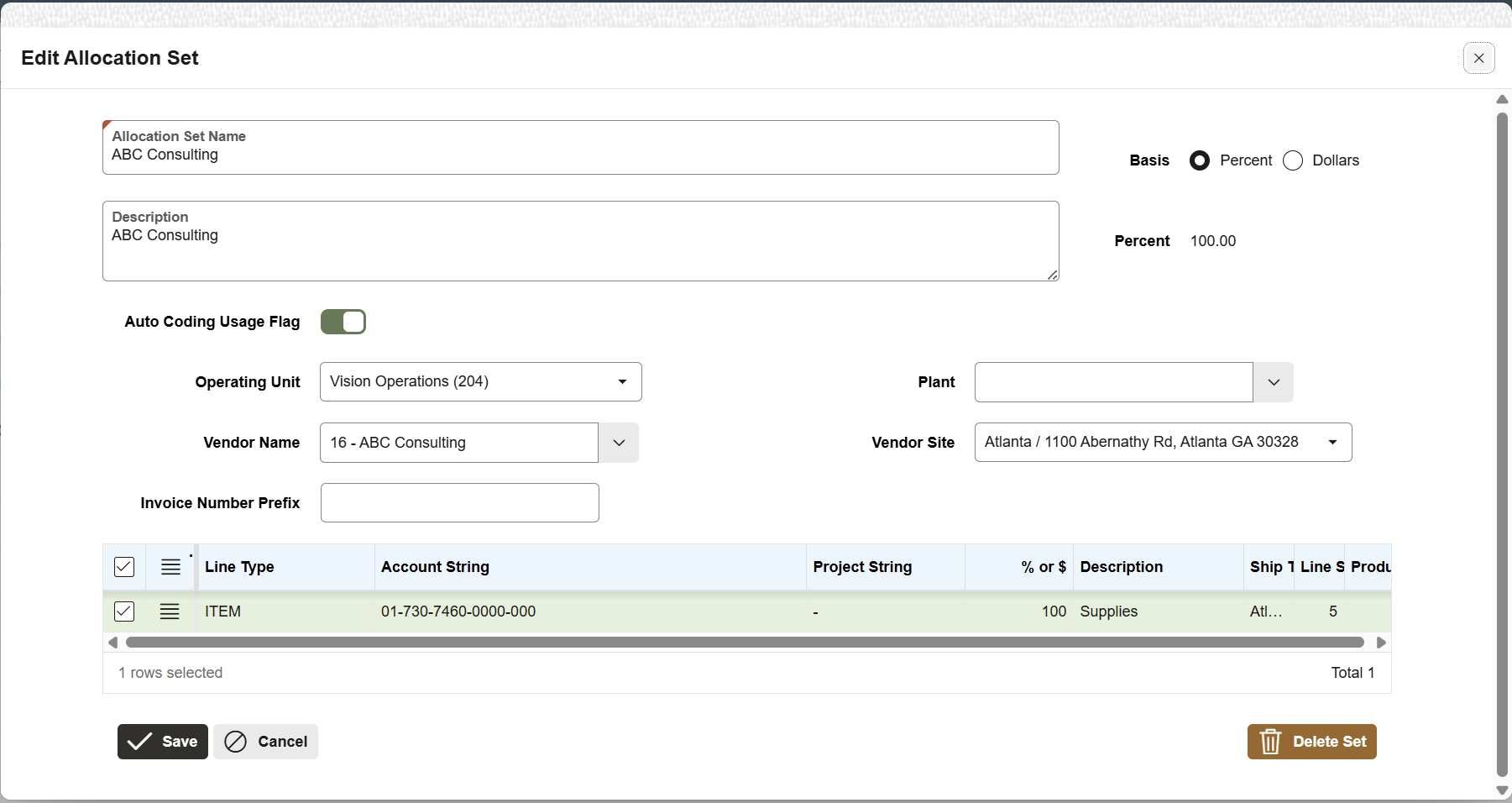
Smart coding
Assign General Ledger accounts, cost centers, and internal orders by rule and by learning, for PO and non-PO invoices.
Flexible matching
Two-way and three-way matching against live SAP purchase orders and goods receipts, with tolerances you set.
Intelligent workflow
Route invoices to the right approvers by amount, entity, department, or project, with mobile sign-off.
Control & compliance
Protect your organization and maintain audit trails
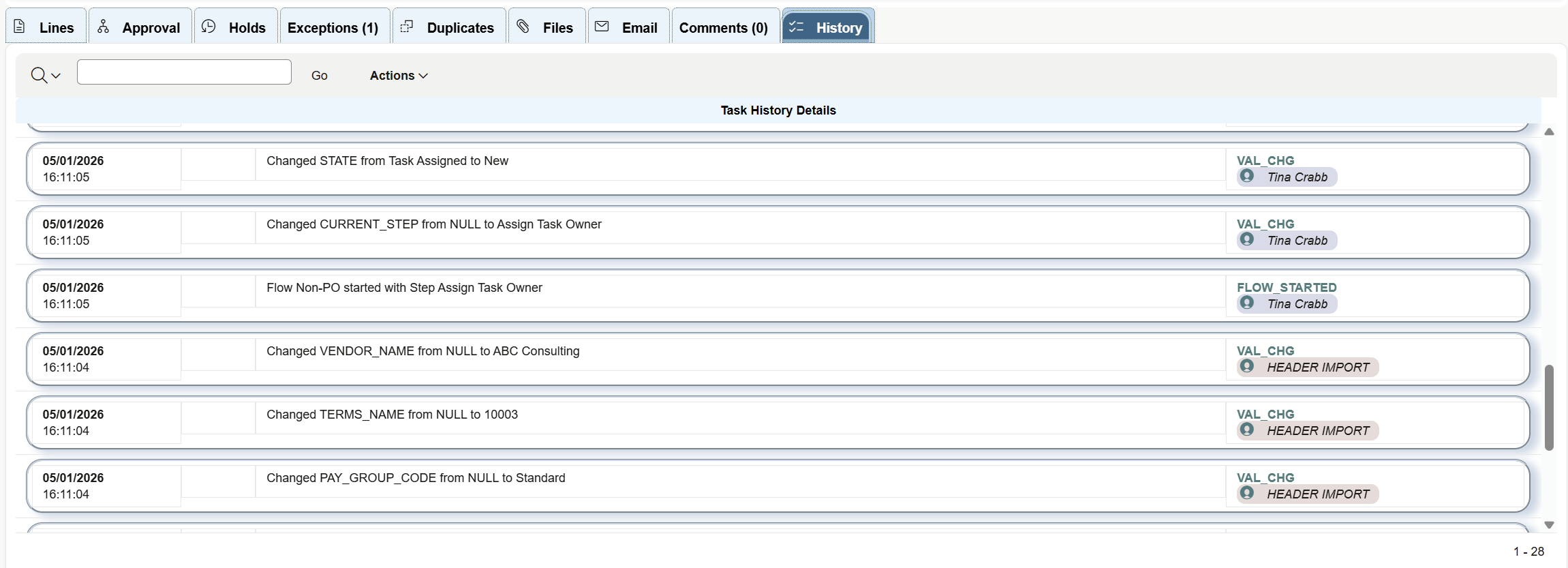
Fraud & duplicate detection
Built-in controls catch duplicate invoices and suspicious patterns before anything posts to SAP.
Audit trail & compliance
Complete audit trail from capture to the posted SAP document, with segregation of duties enforced before posting.
Integrate & analyze
Post natively to SAP and gain insights
Native SAP posting
Post through SAP's own interfaces (MIRO and FB60) or standard invoice APIs. SAP stays the system of record.
Analytics & reporting
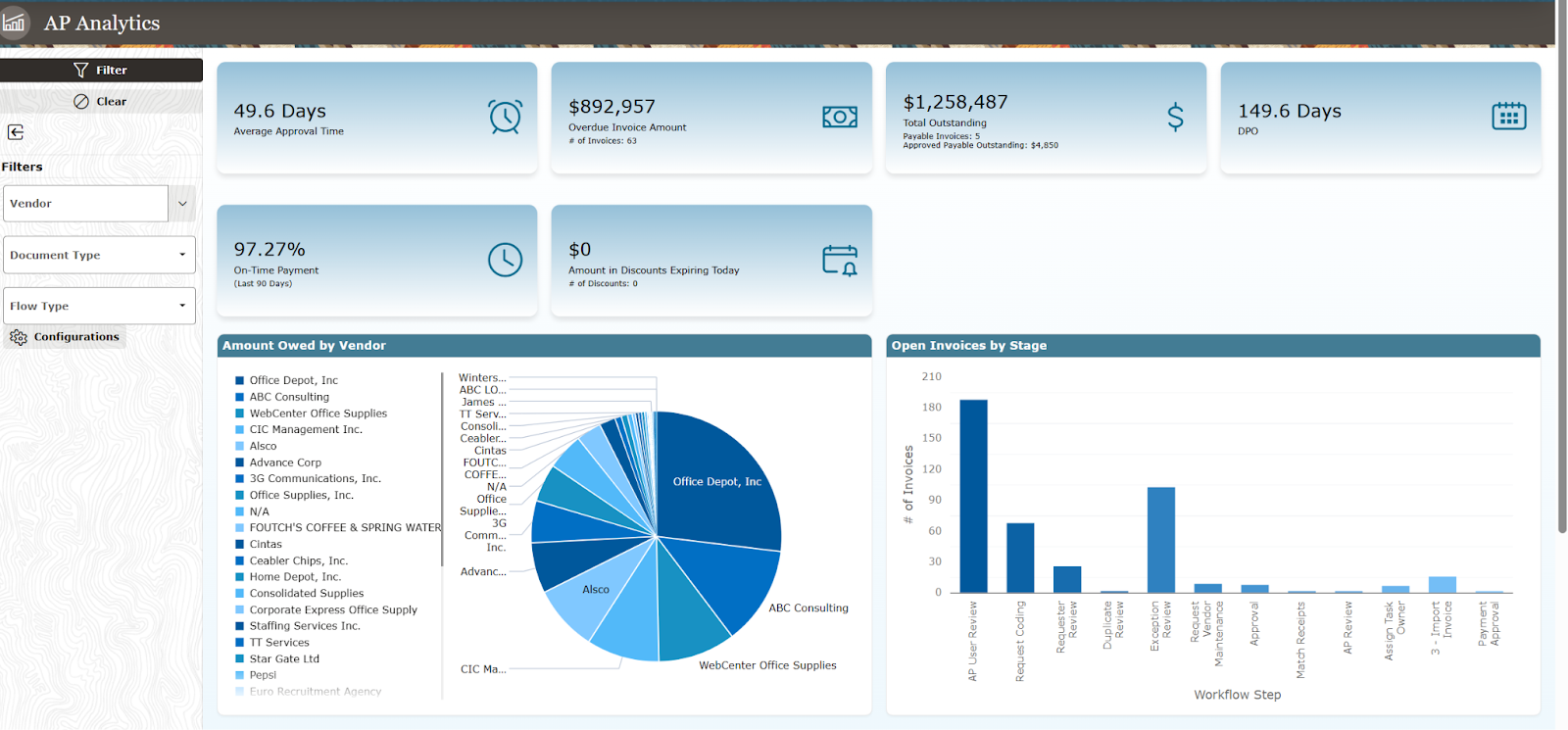
Real-time dashboards show processing times, blocked invoices, and team performance.
Your unique rules
Every finance team runs AP a little differently
These are the cases that rarely fit one fixed process. You configure how each one is handled on the OAN layer, instead of customizing SAP or reconfiguring a rigid add-on.
The invoice does not match the purchase order
SAP blocks the invoice the moment it falls outside a tolerance key. Decide what happens instead: auto-accept minor price or quantity variances, route to the buyer, or hold, with different tolerances by vendor and category, so far fewer invoices sit in the blocked queue.
One payment, many invoices
Group, net, and offset invoices, credits, and subsequent debits the way your treasury team pays, then hand SAP a clean result for the automatic payment run.
Complex coding and allocations
Split one invoice across cost centers, internal orders, work breakdown structure elements, and General Ledger accounts with allocation rules, instead of hand-coding every line in the FB60 entry screen.
Company-code and country differences
Different approval matrices, tolerance keys, and document requirements per company code or country, all on one layer, all still posting to SAP.
What finance gains
Faster payments, a cleaner close, and lower risk
 Native connectors for EBS and Fusion
 Independently audited controls
 Listed and deployable on OCI
Customer success
Trusted by finance leaders
“OAN transformed our AP department. We went from constant overtime and manual data entry to a streamlined process where the team focuses on exceptions and strategy, not keying invoices.”
65%less processing time
FAQ
Common questions about SAP, posting, and control
How does OAN post invoices into SAP?
Validated invoices post through SAP's own interfaces, the standard invoice entry transactions (MIRO for purchase-order invoices and FB60 for non-PO invoices) or standard SAP invoice APIs. They process the normal SAP way, and SAP remains your system of record.
Is this a staging system that holds our data?
No. OAN is a control layer, not a data silo. It orchestrates SAP's own interfaces and keeps only its own working records: rules, mappings, approvals, and audit history. Your transactional data stays in SAP.
How is this different from Vendor Invoice Management (the OpenText add-on)?
Vendor Invoice Management is powerful but tightly coupled to SAP, and small business-rule changes can become complex, costly configuration, with rework on an S/4HANA migration. OAN keeps your business-specific rules in a flexible layer, so change is configuration rather than a project, and it works even across a mixed ERP estate.
Does it handle invoices without a purchase order?
Yes. Non-PO invoices are captured, coded to the right General Ledger accounts and cost centers by rule, routed for approval, and posted to SAP, with the same controls as purchase-order invoices.
Can it match against purchase orders and goods receipts?
Yes. It performs two-way and three-way matching (purchase order, goods receipt, and invoice) against live SAP data, with tolerances you define, and routes exceptions to your team to resolve.
Will it survive our move to SAP S/4HANA?
Yes. Because the AP logic lives on the OAN layer and connects through SAP's standard interfaces, your process carries forward across the migration instead of being reworked.
AP assessment
Bring your hardest invoice scenario, and we will show you how it runs on SAP
Book a working session with an OAN AP architect. Bring the exceptions that are hard to handle in SAP or your Vendor Invoice Management setup, and we will map exactly how OAN handles them and posts to SAP.
No commitment. A working session with architects who have automated AP around SAP and Vendor Invoice Management setups.